Documentation / v2 schema
See the request
before you send it.
TokenEyes is an offline-first Go CLI for estimating mixed text, image, audio, and document usage across OpenAI, Claude, and Gemini models.
01 / Getting started
Install and make your first estimate
Install the latest release, then point TokenEyes at any mix of files, directories, or globs. Repository content stays local.
Install on macOS or Linux
/bin/sh -c "$(curl -fsSL https://tokeneyes.io/install.sh)"The installer downloads the matching binary, verifies its SHA-256 checksum, and installs it to ~/.local/bin. Set TOKENEYES_VERSION or TOKENEYES_INSTALL_DIR to override the version or destination.
Install from source
With Go 1.26 or newer:
go install github.com/polera/tokeneyes/cmd/tokeneyes@latestEstimate one request
tokeneyes estimate README.md 'pkg/**/*.go' \
  --prompt 'Review this code' \
--model gpt-5.5Local estimates work without provider API keys. TokenEyes only contacts a provider when you explicitly use --verify.
01A / Staying current
Upgrade securely from the CLI
Release builds check GitHub for a newer release at most once every 24 hours after a successful interactive command. If an update is available, TokenEyes offers to install it or defer the reminder for 24 hours. Development builds skip this automatic check.
tokeneyes upgradeThe explicit command checks immediately, including from a development build. The updater downloads the archive for the current operating system and architecture, verifies its SHA-256 digest against the release’s checksums.txt, and replaces the current executable.
They send no repository, source, or prompt content. Set TOKENEYES_NO_UPDATE_CHECK=1 to disable automatic checks; you can still run tokeneyes upgrade whenever you choose.
02 / Collection
Build the input set
Combine positional files, directories, and shell globs with inline prompts, stdin, or Git-aware presets. Scans honor .gitignore and .tokeneyesignore, skip common dependency and build directories, and never follow symlinks.
Exact local BPE for OpenAI, heuristic ranges for Claude, and calibrated bounded estimates for Gemini.
PNG, JPEG, WebP, and the first frame of GIF files.
WAV, MP3, AAC/M4A, FLAC, and Ogg with optional transcript sidecars.
PDF, DOCX, PPTX, and XLSX with native or normalized-text processing.
Repository presets
| Preset | Collects |
|---|---|
| tracked | Files tracked by Git. |
| changed | Changed and untracked working-tree files. |
| plan | Common planning and instruction files in the repository. |
printf 'Explain this patch' | tokeneyes estimate \
  --stdin --preset changed --json --no-save
Bounded parallel work
File reads, hashing, and media inspection use a bounded worker pool. The same --workers setting (short form -j) also controls how many model comparisons run at once.
tokeneyes compare --preset tracked --workers 4By default, TokenEyes uses the available Go runtime parallelism, capped at eight workers. Set --workers 1 for sequential processing. Regardless of worker count, results are committed in path order so scan limits, warnings, and output remain deterministic.
03 / Command reference
Core commands
The CLI has six compact workflows. Use tokeneyes help for the top-level usage summary.
| Command | Purpose |
|---|---|
| estimate | Estimate one model with source-level and modality-level detail. |
| compare | Run the same assembled request across multiple model families. |
| history | List privacy-safe locally saved runs. |
| diff | Compare two saved run IDs. |
| models | List catalog models or inspect one model’s metadata. |
| upgrade | Check for and securely install the latest release. |
03A / Terminal dashboard
Scan the whole comparison at a glance
Add --tui to estimate or compare for a compact dashboard showing each model’s input tokens, context utilization, and expected API cost.
tokeneyes compare --preset tracked \
  --models gpt-5.5,claude-sonnet-4-6,gemini-3.5-flash \
  --tui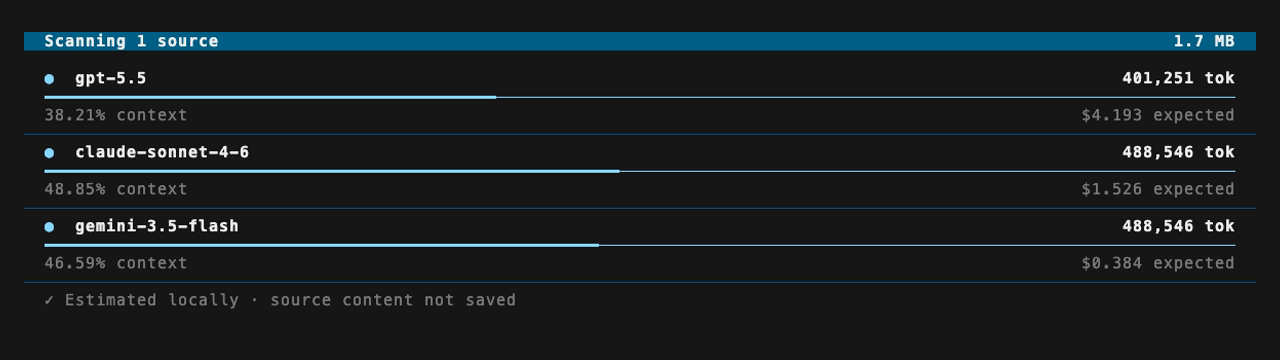
The dashboard adapts to narrow terminals while preserving the same local estimate and privacy guarantees.
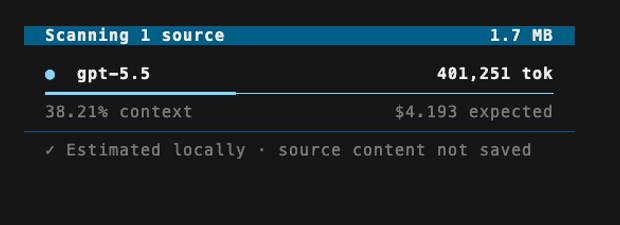
The dashboard respects NO_COLOR and the COLUMNS environment variable. Because both formats control the full output, --tui and --json cannot be used together.
Screenshots use synthetic source data and are generated with VHS.
03B / Estimate
Inspect one model deeply
An estimate reports input tokens, an uncertainty range when applicable, context percentage, low/expected/high cost scenarios, each source contribution, and per-modality formulas.
tokeneyes estimate meeting.mp3 \
  --model claude-sonnet-5 \
  --processing normalized-text \
  --transcript meeting.mp3=meeting.txt
Choose the decision bound
Use --estimate-bound expected|high to choose which local token count drives context-overflow checks, input budgets, pricing tiers, and costs. expected is the compatibility default. high uses the upper end of every bounded estimate and is the conservative choice for CI.
tokeneyes estimate . --model claude \
  --estimate-bound high \
  --fail-overflow --max-input-tokens 900000
Exact local tokenizers have identical expected and high bounds. Claude’s bundled local counters are explicitly labeled heuristics: their ranges do not claim calibrated statistical coverage or official Anthropic counts.
If a selected model cannot process a modality, TokenEyes labels the capability instead of quietly omitting that source.
03C / Compare
Use one payload across providers
compare assembles the request once, then evaluates it for every selected model. Add output and reasoning assumptions to make the expected cost scenario match your workload.
tokeneyes compare --preset tracked \
  --models gpt-5.5,claude-sonnet-4-6,gemini-3.5-flash \
  --output-tokens 1000,4000,16000
03D / History
Track how requests change
Runs are saved locally by default. History records labels, paths, SHA-256 hashes, byte counts, results, and configuration—never prompt text, source bytes, extracted text, transcripts, or thumbnails.
tokeneyes history --limit 20
tokeneyes diff RUN-A RUN-B
tokeneyes diff RUN-A RUN-B --json
Use --no-save for ephemeral commands or set no_save: true in configuration.
03E / Catalog
Know which data powered the result
The embedded model catalog is an immutable release snapshot. Every result includes the catalog version and pricing date. The bundled 2026-07-27 catalog contains:
| Provider | Models |
|---|---|
| OpenAI | gpt-5.6, gpt-5.6-terra, gpt-5.6-luna, gpt-5.5, gpt-5.4, gpt-5.4-mini, gpt-5.4-nano |
| Anthropic | claude-fable-5, claude-opus-5, claude-opus-4-8, claude-opus-4-7, claude-sonnet-5, claude-sonnet-4-6, claude-haiku-4-5 |
gemini-3.1-pro-preview, gemini-3.5-flash, gemini-3.1-flash-lite, gemini-2.5-pro, gemini-2.5-flash, gemini-2.5-flash-lite |
tokeneyes models list
tokeneyes models show claude-opus-5
tokeneyes models show claude-opus-5 --json
Claude Sonnet 5 uses introductory pricing through August 31, 2026; TokenEyes warns that its pricing is stale after that validity window. Claude Opus 5 and Claude Haiku 4.5 use standard pricing without an introductory-pricing expiry.
Applicable GPT-5.x models switch to long-context pricing above 272,000 input tokens. Gemini Pro models switch above 200,000 input tokens, and Gemini 2.5 Flash models use audio-specific input pricing when estimating audio. TokenEyes also warns when catalog pricing is more than 180 days old.
Use --catalog override.json to replace existing model entries or add private/new models using the JSON shape printed by models show.
04 / Configuration
Set repository defaults
Place defaults in .tokeneyes.yaml. Command-line flags take precedence. Ordered override rules apply to matching source paths, with later matches replacing fields set earlier.
model: gpt-5.5
models: [gpt-5.5, claude-sonnet-4-6, gemini-3.5-flash]
output_tokens: [1000, 4000, 16000]
processing: native
image_detail: auto
workers: 4
no_save: false
fail_overflow: false
estimate_bound: expected
Collection limits and workers
Control scan size with max_file_bytes, max_total_bytes, max_media_size, max_media_count, max_pages, and max_duration. Exceeded limits produce warnings and mark a scan incomplete. Set workers to choose the bounded collection and comparison concurrency for every run; --workers or -j overrides it for one command.
05 / Verification
Opt in to official token counts
Local estimates are the default. With --verify, TokenEyes explicitly sends the assembled request to supported official token-counting endpoints. It never asks the model to generate a response.
ANTHROPIC_API_KEY=... tokeneyes estimate plan.md \
  --model claude --verify

GEMINI_API_KEY=... tokeneyes estimate plan.md \
--model gemini --verifyAdd --require-verification to return exit code 7 when verification is unsupported or fails.
A successful official count is authoritative for limits and costs, regardless of the selected estimate bound. The local estimate and its range remain recorded so you can compare them with the verified result.
Credentials are read from ANTHROPIC_API_KEY, GEMINI_API_KEY, or GOOGLE_API_KEY and are never stored. File upload permission is CLI-only: --allow-file-upload requires --verify and cannot be inherited from repository configuration.
06 / Automation
Make budgets executable
--json emits the stable tokeneyes.run.v2 schema. Each result records input_tokens, input_low, input_high, the selected estimate_bound, and the resulting decision_input_tokens. Formula versions make the local estimator behind a result inspectable.
Threshold flags map to distinct exit codes so a CI job can explain exactly why it stopped. Overflow, input-token, and cost decisions consistently use decision_input_tokens: the selected local bound, or a successful official count when verification is enabled.
| Code | Meaning |
|---|---|
| 0 | Success |
| 2 | Usage or configuration error |
| 3 | Selected decision count exceeds context with --fail-overflow |
| 4 | Selected decision count exceeds --max-input-tokens |
| 5 | --max-cost-usd exceeded by the expected output scenario, priced with the selected decision count |
| 6 | Incomplete scan with --fail-incomplete |
| 7 | Required verification failed |
tokeneyes compare --preset changed \
  --models gpt-5.5,claude-sonnet-4-6 \
  --estimate-bound high \
  --max-input-tokens 200000 \
  --max-cost-usd 0.50 \
  --fail-incomplete --json
07 / Privacy
What stays on your machine
TokenEyes is built around an explicit boundary: collection, format inspection, tokenization, estimation, and history are local. It sends request content only when you explicitly ask for provider verification. Release builds may contact GitHub for a version check after an interactive command, but send no repository or prompt content; set TOKENEYES_NO_UPDATE_CHECK=1 to disable these automatic checks.
| Stored | Never stored |
|---|---|
| Source labels and paths | Source or prompt contents |
| SHA-256 hashes and byte counts | Extracted document text |
| Token results and configuration | Transcripts and thumbnails |
| Catalog and verification metadata | Credentials and upload identifiers |
Format detection uses content signatures instead of trusting extensions. Scans are deterministic, do not follow symlinks, and surface unreadable or excluded inputs as warnings.